A garment quote needs to cover the setup as well as the run. The Print Shop Sheets screen printing pricing calculator is an editable Excel workbook for comparing quantity tiers for one garment design, with separate setup and recurring charges.
Enter your garment cost, print locations, screen counts, estimated times, and pricing assumptions. Use the calculated quote and contribution to evaluate each quantity option before choosing a price. The included sample data is fictional and for training only; this is a workbook, not print MIS software or a consulting service.
Where this workbook helps
- Compare alternative delivered quantities using the same job assumptions.
- See setup charges separately from costs that increase with production quantity.
- Account for estimated spoilage in garment, run labor, and consumables costs.
- Identify incomplete inputs and review low-contribution or zero-dollar quotes before choosing a tier.
What is in the file
How to get started
1. Replace the fictional job assumptions
Open the file in Excel or LibreOffice with automatic calculation enabled. On Assumptions, enter your garment cost, spoilage allowance, hourly direct labor rate, screen supplies/use cost, setup and recurring markups, minimum contribution margin, and extra job setup minutes.
Edit the cream cells. Other cells contain formulas or labels, but formula cells are not locked. Keep an unchanged copy before making edits.
2. Enter the print locations
On Print Locations, replace the fictional rows with the locations for this design. Enter colors, screens, setup minutes, run minutes per production garment, and ink/consumables cost per production garment. Leave unused location rows entirely blank.
Run minutes must include all colors at that location. Setup minutes include preparation and cleanup; do not count that labor again in the screen supplies/use cost.
3. Add the quantities you want to quote
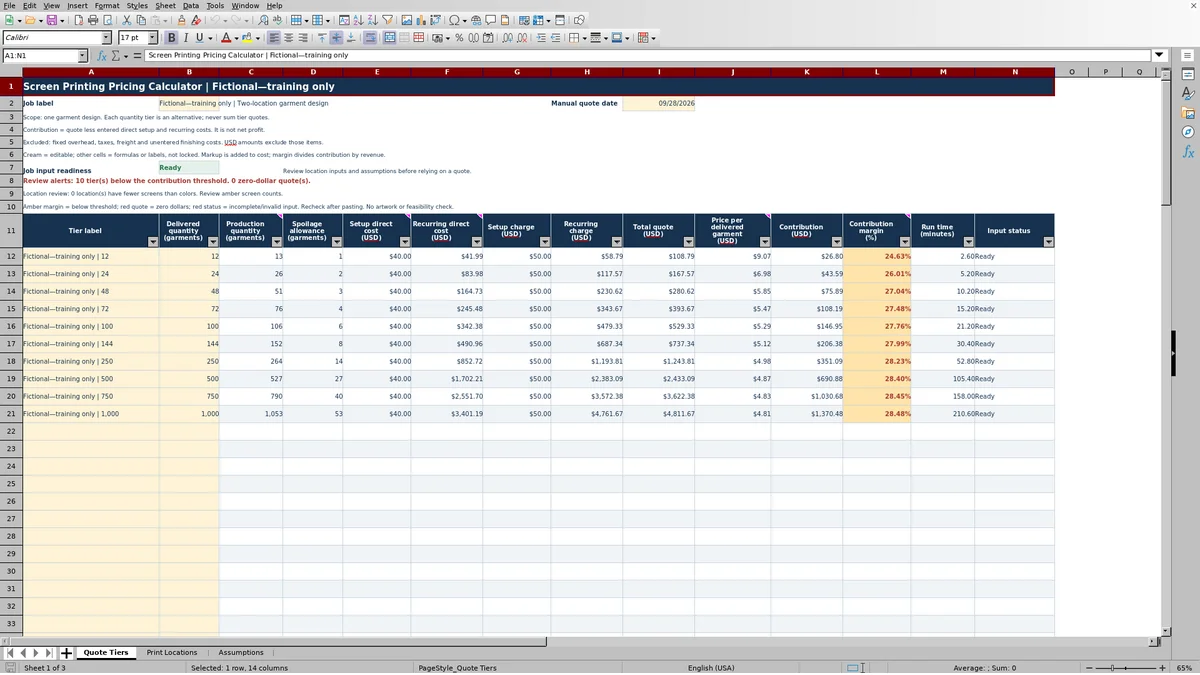
On Quote Tiers, update Job label and Manual quote date, then enter a tier label and a positive whole number under Delivered quantity (garments) for each option. Read the production quantity, separate charges, total quote, price per delivered garment, contribution, and estimated run time across the row.
4. Resolve alerts before selecting a price
Check Job input readiness and each tier's Input status. Correct incomplete or invalid entries, then review amber screen counts, low contribution margins, and red zero-dollar quotes. Readiness confirms the workbook's input checks, not whether the design can be printed as entered.
Compare quantity options for one garment design
Use a tier when the customer is deciding how many garments to order with the same design and print locations. Each row uses the same job-level costs, markups, and location details. The delivered quantity changes; the setup direct cost stays the same across those alternatives.
Each tier is an alternative, not another order line. Never add the tier quotes together to create a job total. A lower price per delivered garment at a larger quantity reflects the same setup charge spread across more delivered garments, alongside the recurring charges and whole-garment spoilage rounding.
The workbook does not introduce different garment prices or markups at different quantity breaks. If a supplier offers a lower garment cost at a larger quantity, save the original estimate and evaluate the revised assumption in a separate copy. Otherwise, changing Garment cost on Assumptions changes every tier's calculation.
Fictional example: quote 100 delivered garments
The workbook's fictional training inputs show how costs flow into a quote. They are not recommended rates or production standards. For this example, the customer needs 100 delivered garments.
- Garment cost is $3.00 per purchased garment, spoilage is 5%, direct labor is $24.00 per hour, and screen supplies/use cost is $8.00 per screen.
- The front has two colors and two screens, with 20 setup minutes, 0.12 run minutes per production garment, and $0.10 in ink/consumables per production garment.
- The back has one color and one screen, with 10 setup minutes, 0.08 run minutes per production garment, and $0.05 in ink/consumables per production garment.
- Extra job setup is 10 minutes. Setup markup is 25%, recurring markup is 40%, and the minimum contribution margin warning threshold is 30%.
To allow for garments not delivered, production quantity is rounded up from 100 ÷ (1 − 0.05), giving 106 garments and a six-garment spoilage allowance. This is a share-of-production calculation, not simply 5% added to the delivered quantity.
Setup direct cost is three screens × $8.00 plus 40 setup minutes × $24.00 ÷ 60, totaling $40.00. Recurring direct cost is 106 × [$3.00 + $0.15 + (0.20 minutes × $24.00 ÷ 60)], totaling $342.38. Garment, consumables, and run labor costs therefore apply to all production garments, including the spoilage allowance.
After the separate markups and charge rounding, setup charge is $50.00 and recurring charge is $479.33. The total quote is $529.33, with a displayed price per delivered garment of $5.29. Contribution is $146.95, and contribution margin is 27.76%. Estimated run time is 21.20 minutes, excluding setup.
The margin is below the entered 30% threshold, so this tier needs review. Check the cost and time estimates first, then consider revised markups before selecting a quote. Also use Total quote (USD) as the calculated total: multiplying the displayed two-decimal unit price by the delivered quantity can differ because the underlying unit price has more precision.
Keep setup, screens, and run time from overlapping
Separate one-time work from work repeated on each garment. Setup direct cost combines total screens multiplied by Screen supplies/use cost with location setup time and Extra job setup time, valued at the Direct labor rate. Recurring direct cost combines garment cost, summed location consumables, and summed location run labor for every production garment.
Count each labor task once. Location setup minutes include preparation and cleanup. Extra job setup time is only for additional job-level work not already entered at a location. Screen supplies/use cost should exclude labor already represented in setup minutes.
Colors are recorded, but they are not multiplied into run time again. Enter Run time per production garment (minutes) for all colors at that location. If you enter time for just one color, the workbook will not expand it into the full location time for you.
Run time (minutes) on Quote Tiers multiplies production quantity by the summed location run minutes per garment. It is an estimate based on your entries, not a press schedule or a promised turnaround time. Review setup and other work separately before making a due-date commitment.
Interpret contribution without confusing it with profit
Setup markup and Recurring markup add a percentage to their respective direct costs. The workbook rounds each resulting charge to cents, then adds the charges to produce the total quote. Contribution is that quote less the entered setup and recurring direct costs; contribution margin divides contribution by the quote.
Markup is not margin. A percentage added to cost does not produce the same percentage of revenue as contribution. Read Contribution margin (%) rather than assuming that either markup is the resulting margin.
Minimum contribution margin is a warning threshold, not a target-price solver. Changing it changes which results need attention; it does not change the quote. To evaluate a different price, revise the applicable markup and review the resulting charges and margin.
Contribution is not net profit. Fixed overhead, taxes, freight, and unentered finishing costs are excluded. Before treating a quote as acceptable, account for those items outside this calculation and decide whether the remaining contribution is sufficient for your shop's needs.
Troubleshooting blank quotes and warning colors
A blank quote is not necessarily a zero-dollar quote. The workbook suppresses calculations when required job inputs are incomplete or invalid. A completely unused tier row also stays blank.
- Blank results or Check inputs: Verify that all eight editable assumptions contain nonnegative numbers, spoilage is less than 100%, and the contribution threshold is from 0% through 100%. At least one complete print location is required, and every entered location must pass its checks.
- Incomplete location: Supply a location name and all five numeric entries. Colors and screens must be positive whole numbers; setup time, run time, and consumables must be nonnegative. Clear an unused row entirely instead of leaving a location name or stray value behind.
- Incomplete or invalid tier: Enter a positive whole number for delivered garments. A tier label without a numeric quantity is incomplete; zero, a negative quantity, or a fractional garment count does not pass readiness.
- Amber screen count: Screens are fewer than colors. Review the intended printing method and correct the count if needed. This warning does not establish whether the design is feasible.
- Red zero-dollar quote: Valid numeric inputs can still produce a zero quote. Review the entered costs and times. When total quote is zero, contribution margin is blank because it cannot be divided by zero; that blank is not evidence of an acceptable margin.
Recheck status messages after pasting values because pasting may bypass entry validation. If expected calculations do not update, confirm automatic calculation is enabled. If a formula was overwritten, restore it from an unchanged workbook copy rather than typing a replacement quote into the formula cell.
Keep a record of the estimate you actually offered
Before revising stock cost, run time, or markup, save a dated copy of the estimate used for the offer. Update Job label and Manual quote date on Quote Tiers so the saved file is identifiable. Treat the date as a manual entry, not an automatically maintained revision record.
Changes to the shared assumptions or print locations affect the quantity alternatives together. Preserve the earlier file if you need to explain why a revised quote differs from the original, then identify which tier the customer selected.
Ready is an input status, not production approval. The workbook does not inspect artwork, certify proofs, or establish production feasibility. Keep the selected quote alongside your normal artwork, proof, and job-ticket records, and resolve those production decisions through your shop's existing process.
Compare this workbook with a blank spreadsheet
A blank spreadsheet is a realistic alternative if your shop already maintains its own estimating formulas. The choice depends on whether this workbook's one-design, shared-assumption structure matches the quote you need to prepare.
| Method | Cost and quantity structure | Calculation review | Changes and records |
|---|---|---|---|
| Print Shop Sheets workbook | Prepared setup and recurring calculations, shared job assumptions, and alternative quantity tiers for one garment design. | Includes input readiness, screen-count warnings, low-margin warnings, and zero-dollar quote warnings. No artwork or feasibility inspection. | Editable Excel file with unlocked formulas and a manual quote date. Keep dated copies when revising an offer. |
| Blank spreadsheet | You define the cost categories, quantity logic, and whether rates vary by tier. | You must build and verify formulas and any input or margin checks you need. | You define the record layout and revision method and maintain the calculation cells yourself. |
Use this workbook when you want the documented setup-versus-recurring structure for garment quantity alternatives. Start with a custom spreadsheet when you need materially different calculations, such as separate garment costs within the same quote, and can build and verify that logic. Neither choice should be treated as a substitute for your production review.
Frequently asked questions
Can I use the workbook in LibreOffice?
The workbook's instructions specify Excel or LibreOffice with automatic calculation enabled. After opening it, check that results recalculate and review the input statuses before relying on a quote.
How many tiers and print locations can I enter?
The prepared ranges support 100 quantity tiers on Quote Tiers and up to 100 print locations on Print Locations. Leave unused location rows entirely blank. Those locations all feed the same garment design and its alternative quantity tiers.
Can one quote include different garment costs by size or style?
The calculation uses one Garment cost assumption for every production garment. It does not provide a size/style cost breakdown within a tier. Use separate estimates when costs differ materially, or use a calculation structure designed for mixed garment costs.
Does the calculator choose the number of screens from the color count?
No. You enter colors and screens separately for each location. The workbook warns when screens are fewer than colors, but it does not determine the screen plan or confirm that the intended printing method will work.
Are the included labor rate and spoilage allowance recommended values?
No. All included sample values are fictional training data. Replace them with estimates appropriate to the job and your shop. Rates, spoilage allowances, and operating times remain your assumptions, not guaranteed costs or capacities.
Editorial coverage

Clara WinslowPrint estimating editor

Miles FenwickPrint workflow editor