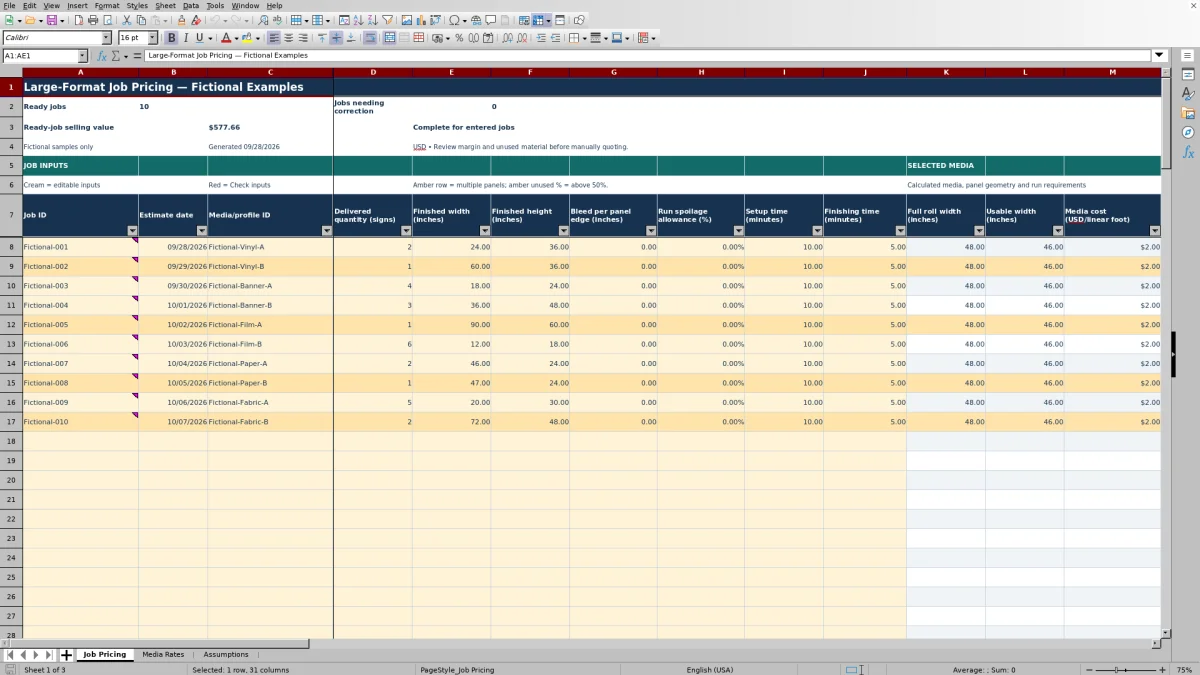
A wide sign can require multiple panels even when its finished area looks modest. The Print Shop Sheets large-format print pricing workbook helps you estimate roll media, ink, setup, run and finishing costs before setting a selling price for the job.
This editable Excel resource calculates price per job and per delivered sign, not per copier page. Replace the fictional sample rates and assumptions, then review panel requirements, unused material and gross margin before manually quoting.
Where this workbook helps
- Account for usable roll width when a sign needs multiple panels.
- Keep setup, production run and finishing costs separate during estimating.
- See how markup on estimated cost translates into selling price and gross margin.
- Identify entered jobs needing correction before relying on the ready-job selling total.
What is in the file
How to get started
1. Set up the media profile you will use
In Media Rates, enter a unique Media/profile ID, full roll width and usable width in inches, cost in USD per linear foot, and run speed in linear feet per minute. Use your own supplier costs and estimated operating speed; the supplied profiles are fictional.
2. Replace the operating assumptions
Open Assumptions and review ink cost, machine and labor rates, run staffing fraction, inter-panel gap, startup waste and default markup. Read the adjacent definitions before entering values. In particular, the machine rate excludes ink, media and labor, which the workbook costs separately.
3. Enter the sign job
On Job Pricing, enter a unique Job ID, Estimate date, Media/profile ID and Delivered quantity (signs). Add finished dimensions and bleed in inches, run spoilage as a percentage, and setup and finishing time in minutes. Width runs across the roll; height follows the feed direction. Enter total setup and finishing minutes for the job, not minutes per sign.
4. Review the result before quoting
Resolve any Check inputs status, then review panels, run requirements, estimated costs and selling prices. The default Markup on cost (%) can be overridden for an individual job. Check gross margin and unused material as well as price; a Ready result is an input-readiness signal, not approval of the artwork or production plan.
Decide whether the panel model fits the sign
The workbook divides finished width across the selected profile’s usable roll width. It first subtracts twice the bleed per panel edge from usable width, then rounds the required panel count up to a whole number. Panel cut width is the finished width divided by that count, plus bleed on both edges.
This is a sequential, one-across panel model. It does not nest smaller signs beside one another, rotate artwork automatically or add seam overlap. Its panel construction assumes butt-joined seams, with bleed applied to every panel edge.
Before using the price, decide whether that construction matches the intended job. If rotating the sign is appropriate, manually swap finished width and height and compare the revised estimate. If the work requires overlaps or a nested layout, establish that production plan separately rather than treating the calculated panels as production-ready imposition.
Match time and area inputs to the costs they drive
Ink cost follows printed panel area in square feet, including bleed and run spoilage. It uses the Ink cost rate on Assumptions; it does not measure image coverage from artwork. Choose an estimated area rate suitable for the work rather than assuming the workbook has inspected the file.
Setup cost is setup minutes divided by 60, multiplied by the sum of machine and labor hourly rates. Run cost uses calculated run minutes and the machine rate plus staffing-adjusted labor. The Run staffing fraction affects run labor only, not setup or finishing.
Finishing cost uses the entered finishing minutes and labor rate only. If you enter minutes per sign instead of total job minutes, a multi-sign job will be understated. Estimate all finishing labor for the delivered quantity before entering it, and account separately for any required finishing materials or equipment charges that this labor-only calculation does not represent.
Run speed is measured in linear feet per minute—not square feet per hour. Run time includes panel feed, gaps and spoilage. Startup-waste handling belongs in your setup-time estimate instead.
Fictional example: price a two-sign panel job
This illustrative job uses the workbook’s verified fictional Fictional-Vinyl-A profile and operating rates. It is not a production recommendation. Enter two delivered signs, each 60 inches wide by 24 inches high, with zero bleed and zero run spoilage for this example. Allow 10 setup minutes and 15 total finishing minutes.
The fictional profile has a 48-inch full roll width, 46-inch usable width, a media cost of $2.00 per linear foot and a run speed of 1 linear foot per minute. The fictional assumptions are $0.10 per square foot for ink, $30.00 per hour for the machine, $24.00 per hour for labor, full run staffing, zero inter-panel gap, zero startup waste and 50% markup on cost.
- Each sign needs two panels because 60 inches exceeds the 46-inch usable width. Each panel is 30 inches wide.
- Four panels total × 24 inches of feed ÷ 12 produces 8 linear feet of run length. Printed ink area is 20 square feet, and run time is 8 minutes.
- Media costs $16.00, ink $2.00, setup $9.00, run $7.20 and finishing $6.00. Total estimated cost is $40.20.
- Applying 50% markup gives a selling price of $60.30 for the job, or $30.15 per delivered sign. Gross margin is 33.33%.
- The purchased roll area is 32 square feet, compared with 20 square feet of finished signs. The calculated unused share is 37.50%.
The example shows why finished area alone does not describe media use: the model charges the full roll width for each linear foot consumed. Your next decision is whether the assumed panel layout, time allowances and rates fit the actual job. Replace the zero bleed and spoilage allowances if your planned production requires them, then review the revised price.
Use markup without mistaking it for margin
Markup and gross margin use different denominators. Selling price/job (USD) is total estimated cost multiplied by one plus Markup on cost (%), rounded to cents. Gross margin (%) is selling price minus estimated cost, divided by selling price.
The markup column initially draws from Default markup on cost on Assumptions. You can enter a different percentage in a job’s markup cell when that estimate needs a separate pricing decision. An override replaces that cell’s link to the default, so later default changes will not update the overridden value.
Use the gross-margin result to interpret the proposed price, not as a promise of net profit. It reflects only the costs represented in this model. Selling price/sign (USD) divides the rounded job price by delivered quantity and rounds again, so multiplying the displayed unit price back by quantity can produce a small rounding difference. Use the job total when reviewing the complete estimate.
If selling price is zero, the gross-margin result is blank because the calculation cannot divide by zero. That blank is not evidence of an acceptable margin; review the rates, time allowances and resulting cost before quoting.
Separate production length, startup waste and unused area
The field labeled Purchased run length (linear feet) on Job Pricing needs careful interpretation: its formula includes production feed, inter-panel gaps and spoilage, but excludes startup waste. Total purchased media length is that result plus Startup waste from Assumptions. The media-cost calculation includes both.
Inter-panel gap is charged after every panel, including the last. It consumes media and run time but is not included in printed ink area. Startup waste is treated as unprinted media, so it increases media cost without adding ink area or calculated run time.
Run spoilage increases production length and ink area without increasing delivered signs. It is a fractional allowance, not a count rounded up to whole replacement panels. If your estimate needs specific whole-panel replacements, check that the allowance adequately represents your plan.
The unused-material percentage compares finished sign area with full-width purchased media area. It therefore captures more than the entered spoilage allowance: width left beside panels, bleed, gaps and startup waste can all affect it. An amber unused result above 50% is a prompt to review the layout and cost—not a statement that every unused portion can be recovered for another job.
Troubleshooting blank prices and incomplete totals
When a row is not Ready, its calculated panel, cost and price results are blank. A blank price is not a zero-dollar estimate. Start with the entered job and selected profile rather than typing a value over the selling-price formula.
- Missing or mismatched profile: Select the Media/profile ID from the list and confirm that its Media Rates row has the required width, cost and speed values. A failed lookup leaves the selected-media fields blank.
- Invalid panel geometry: Usable width must exceed twice the bleed per edge. Check that bleed is entered in inches and that usable width does not exceed full roll width.
- Wrong quantity or identifier: Use a positive whole number of delivered signs and a nonblank, unique Job ID. Do not enter panel count as delivered quantity.
- Wrong date or units: Enter Estimate date as an Excel date, displayed as MM/DD/YYYY. Check that time inputs are minutes and that a spoilage percentage has not been entered as an unintended whole-number value.
The Ready-job selling value summary adds only Ready rows. If Jobs needing correction is nonzero, the workbook displays INCOMPLETE — correct entered jobs. A visible summary total can therefore omit entered work; resolve the flagged rows before treating it as the value of all entered jobs.
These checks concern estimating inputs. They do not inspect artwork, confirm seam suitability or certify a finished sign.
Compare with building an estimate in a blank spreadsheet
Both approaches can support a manually reviewed quote. The practical choice is whether this workbook’s roll-and-panel model matches your jobs or whether you need to build a different calculation structure.
| Method | Calculation setup | Layout treatment | Review support | Ongoing responsibility |
|---|---|---|---|---|
| Print Shop Sheets workbook | Prepared formulas connect media, operating assumptions and job inputs to costs and selling prices. | Sequential, one-across panels with manual dimension rotation; no nesting or overlap model. | Readiness status, ready-job totals, gross margin and unused-material indicators are provided. | You maintain rates, confirm the production plan and retain copies of issued estimates. |
| Blank spreadsheet built in-house | You create and test the cost and pricing formulas. | You define the layout assumptions and implement any required calculations. | You design the input checks, summaries and review indicators you need. | You maintain rates, formulas, documentation and estimate copies. |
Use this workbook when its supported panel construction and cost categories fit the work you quote. Consider a custom spreadsheet when your regular jobs require a materially different model, such as explicit seam overlap or a separately established nested layout. Neither approach should be treated as a substitute for confirming how the sign will actually be produced.
Frequently asked questions
How many jobs and media profiles can I enter?
The workbook has 100 prepared job rows on Job Pricing and a 100-row profile range on Media Rates. Stay within those prepared ranges unless you deliberately extend and test the formulas, validation and summaries; adding rows alone does not establish that all calculations will include them.
What happens when a media rate changes after I quote?
Job rows look up the selected profile’s values from Media Rates, so changing that profile can change estimates that use it. Shared operating assumptions also feed the calculations. Keep a dated copy of the issued estimate before revising rates; do not rely on automatic quote history.
Can I estimate signs made from rigid sheets?
The calculation model is based on roll width, cost per linear foot and feed speed in linear feet per minute. It does not model sheet yield or sheet nesting. Use a sheet-based estimating method when those factors determine the job’s material use and cost.
Does the workbook include every charge needed for a customer quote?
Its estimated cost includes media, ink, setup, run and finishing labor. It then applies markup to produce a selling price. Handle charges not represented by those calculations—such as installation, shipping or tax—separately before issuing the customer quote.
Is this print MIS software or a quoting service?
No. Print Shop Sheets provides an editable Excel workbook, not print management information system software or a consulting service. You supply the operating estimates, review the results and issue the quote manually. The workbook does not control the printer or approve the production handoff.
Editorial coverage

Clara WinslowPrint estimating editor

Miles FenwickPrint workflow editor